Showing posts with label .Nokia Lumia 720. Show all posts

Sep 2, 2013

The Windows Phone Amber Update For Nokia Lumia Smartphones

Nokia recently rolled-out the Nokia Lumia Amber update for smartphones running Windows Phone 8. It promised a better and smarter experience for users, but for how far they it went, quite remarkable I would say. It was built base on users comments and feedback's with innovations on the sideline. Microsoft on the other hand also provided numerous significant additions to the software, here are the rundowns.


Improved image processing

The update brings significantly improved algorithms that offer better noise reduction, color reproduction, exposure control and auto-focus to every phone across the Lumia range. On the Lumia 920, controls to adjust the ISO settings of the camera from 800 to 3200 allow for even better low light performance.

Nokia Smart Camera

Debuted on the Nokia Lumia 925, this new camera app is ideal for taking pictures involving people and movement. Users can now get the app from the Store after downloading Lumia Amber update.

The app brings a slew of different options – use Best Shot to find the sharpest image from a series of 10; combine several shots of people in movement into one with Action Shot; heighten the appearance of speed by blurring the background with Motion Focus; create ideal group shots by choosing the best faces from a series with Change Faces, or remove unwanted objects from pictures.

But the app's performance was scaled according to the capabilities of your device. On the Nokia Lumia 720, 620 and 520, the burst mode used for some effects takes seven pictures rather than ten, and these are a lower resolution than on devices with more RAM (one-megapixel rather than five). Still great for social sharing on the Web.

Nokia Camera Pro

The newly announced Nokia Pro Camera was also made available for Lumia 920, Lumia 925, and Lumia 928. With the app, users can edit images fast and transform them creatively to taste.

 Nokia Video Trimmer and Nokia Video Uploader

Nokia Video Trimmer app is one among the new feature of the update that is capable or trimming taken videos easily without fuss.The said video could then be uploaded straight to youTube and the rest of the video hosting site via the Nokia Video Uploader.

Nokia Glance Screen

By public clamor, Nokia finally released the Sleeping Screen for Symbian counter part, the Nokia Glance Screen that brings a clock to the phone's screen during inactive mode, along with indicators to show battery level when running on a low battery or the phone is charging, and whether your phone is set to ‘silent’.

Users can activate the Nokia Glance screen in the display and touch section in Settings by swiping left to ‘glance’. Nokia Glance screen will be available for all WP8 Lumia devices except the Nokia Lumia 520 and Lumia 625, which have a smaller display memory.

Flip to silence and double-tap to unlock

Another two favorite features from Nokia Symbian phones were the Flipping to silence feature and the double tap to unlock gesture. Flipping the phone over is a great and easy way to mute the incoming call. Double tapping the screen on the other hand is something many people prefer to using the unlock key. Both of these features were optional.

Storage Check and faster map updates.

Storage check is an app that will help free up and manage phone memory while the Nokia Maps could now be updated freely without the need the re-install the whole country anew.


The update covers the Lumia 920 and Lumia 820 as well as Lumia 521, Lumia 810, and Lumia 928 in the US, and the global versions of Lumia 520, Lumia 620 and Lumia 720.

Jun 1, 2013

The Nokia Lumia 720 Journal Wrap Up: Beyond Compare, The 7-2-0 Reasons To Consider

Every beginning has an end, and every end awaits a new beginning, its high time for me ladies and gentlemen to conclude my Nokia Lumia 720 journal in grand, by citing the 7-2-0 reasons to consider in the mid-range Windows Phone 8 bludgeon from Nokia.


The 7 Deadly Advantages

1. The phone is no less than the best in the mid-range market in terms of design and built quality. Its undeniably attrative, classy and had the sealed quality of toughness that only Nokia can deliver. Nokia might have lost the top spot in the mobilephone space but the quality and built of their products have not wethered, it is as always, built to last.

2. Phone fits right in terms of size and dimension. You probably notice that everything is going lenghtier and wider in the smartphone world at the moment, a pointless charade having gone beyond the comforts of man. The purpose of technology was suppose to make life easier but whats hapenning is exactly the opposite, it made peoples lives mesirable by supersizing phone that cannot even be gripped in one hand or fit in the pocket. The Nokia Lumia 720 with its 4.3inch screen conforms perfectly in the hand that users can navigate and use the phone handily. For people to live a life less complicated would definitely makes this world a better place.

3. Unique smartphone experience with Windows Phone 8. You probably heared about the phrase “making the difference” among humanely inspired individuals, well in the smartphone world, the phrase applies to people who discovered Windows Phone and enjoying a huge difference out of it that transcends repetitive norm of just enhance systems that offers the same old tricks and features. Windows Phone is unique, vibrant, exciting and inspiriting.

4. Fluid and Smooth. One of the main blunders of manufacturers in creating a phone for the midrange market is the processor, the high speed quad core ones that brings a savvy user experience doesn’t fit in the picture being expensive and power hungry while low speed processors results to unresponsiveness and freezes, well, Nokia is among the few who doesn’t befell on the problem since Windows Phone operates fludily and smoothly even on a 1Ghz speed processors like that of the Nokia Lumia 720. Graphics transitions were smooth on the phone, opening of apps were fast, its moderately stable performance-wise and it doesn’t bleed power much compared to others. A knock of unparalled superiority in here.

5. A very capable camera with a flicker of innovations. 6.7MP Carl Zeiss lens main camera; HD 1.3MP wide angle front camera; f/1.9 aperture; BSI, Auto-Focus; HD 720p at 30fps, these were just a few of the camera features of the Nokia Lumia 720 capturing stunning pictures of both day and low light conditions. Its an innovation because these had never been seen before in the mid-range device setting a new standard in camera capability.

6. Exclusive and critically acclaimed apps and services to enjoy. Free online/offline turn by turn voice navigation via HERE Drive; informations, photos and reviews on top nearby places including walking guidance to chosen destination via HERE Maps; instant access to the best public transport with detailed overview of stations and stops, departure and arrival times, and estimations on your walking times via HERE Transit; photo editing software at its best for mobile devices via Creative Studio and Smart Shot; holywood quality special effects creating application with Cinemargraph; and so much more. With the Nokia Lumia 720, you’lll never run out of high quality mobilephone apps to enjoy on your devices with more and more titles added to the elite list. Need I have to mention that Nokia offers the best aftersales services in the industry?

7. Altruistic capability and price. The Nokia Lumia 720 is all about users getting the most of the best smartphone functionality at a reasonable price. Built quality was not compromise, the specs, features and all. Humane, I would say in the truest sense.

The 2 Remarkable Drawbacks

1. Missing Apps and Features. Not that there was an operating system with perfect number of apps or had the most ideal features , but it would really be best if Nokia Lumia 720 users could enjoy everything a Nokia Lumia 920 is capable of downloading, or an Android or iPhone can install in their phones. Worst, the phone doesn’t even have some of the Nokia exclusive apps like Nokia Music or Nokia Xpress Browser. In terms of features, Windows Phone is definitely not perfect, for instance, it was my first time to pay a thousand pesos more on data because the phone had no feature to show current used data or set data caps unlike Symbian. Also, automatic sync of files to SkyDrive is a pain since it eats data like their is no tomorrow. Rumor has it though that the Windows Phone Amber update had fairly address the problem, these remains to be seen.

2. Inferior screen quality. The Nokia Lumia 720 had an IPS LCD screen with ClearBlack technology, sounds advance enough but its noticeably grainy and pixelated with an apalling color intensity. Well, maybe because I’m just used to good screen quality like the AMOLED of my Nokia N8 or to my recently trialed Nokia Lumia 920 with PureMotion HD+, but really, screen quality is very improtant for me because it’s the main window to the world beneath the great functionalities of the phone. I get distracted by the grainy lines created by the low pixel density. This was just me though and my peculiar eye, for sure,the phone compared to its counterparts in the mid-tier range is still superior on this aspect.

The 0 Detestable Excuse

No reason that is for anyone not to buy this phone if they are looking for a very capable mid-teir device. Not only that its the best there is in terms of built and construction; the overall system, features and side applications were excpetional in their own way. The phone is a perfect blend of all necessary smartphone elements, beyond illusion, beyond dreams, beyond glimpse and beyond compare.

And so there you go ladies and gentlemen, the 7-2-0 reason to consider in buying the Nokia Lumia 720, the last part of my journal. It has been a wonderful and fun experience for me, hopefully it was able to help you in any way as designed.

The Nokia Lumia 720 Journal Part 1: Beyond Dreams  
The Nokia Lumia 720 Journal Part 2: Beyond Illusion  
The Nokia Lumia 720 Journal Part 3: Beyond Glimpse  
The Nokia Lumia 720 Journal Part 4: Camera and Beyond (Day Shots)  
The Nokia Lumia 720 Journal Part 5: Camera and Beyond (Night Shots)
The Nokia Lumia 720 Journal Part 6: Camera and Beyond (Video Test)
The Nokia Lumia 720 Journal Part 7: Beyond Apps

May 28, 2013

The Nokia Lumia 720 Journal Part 7: Beyond Apps

One of the major reason why Windows Phone is not getting serious attention before was because of its applications offering, it doesn't have most the vital apps offered and enjoyed by users from competing system. Very true indeed a year ago, but this doesn't apply recently because the system is now nearly equip with most of the popular applications in the industry. Whats still missing can only be counted within human fingers because of Microsoft's and Nokia's vigorous effort to address the problem. It wouldn't be long before everything is covered.


Windows Phone Store

The store had now passed the 145,000 mark of application and counting. Solid developers support extended by both Microsoft and Nokia and the invigorating sales of Nokia Lumia line-up could be among the main reasons behind it, but nonetheless, they still needs to continuously entice developers for support because as I said, it still had missing apps compared to other leading systems. Also they must provide cost worthy applications because they had the most expensive prices of all. Take for example, the good old Angry Birds game, Nokia Store, Apple Store and Google Play offers it for free, why is it being sold for a dollar on Windows Phone Store? App's accessibility and affordability is an important factor in third world countries, hopefully they were aware of this.


What I like about the Windows Phone store is its savvy interface, the detailed descriptions of each app and its social network integration where users can share favorite apps online, via messaging or email. Though I would love the store to have an in-depth connection socially to the point that users can know all the apps their friends use on Windows Phone Store so they could download it as well for a much deeper social interaction, and so forth.


Anyway, among my app wishlist were Gravity, Flipboard, SWYPE, Talking Clock, Tong-its Tournament, GetGlue, Candy Crush and a dedicated app for Blogger.com.

Lumia Exclusive Apps

Nokia have been working very hard to pollute the system with important apps. They collaborated with developers and gave them all the support needed in exchange for its exclusivity to Lumia line-up, and I believe the plan had worked effectively with quite a number of apps now listed on the elite list, and that consumers choosing Nokia instead of other brands because they could enjoy more apps and features they deserved.


The Nokia Lumia 720 though unlike its elder brethren had only 512MB of RAM which resulted to compatibility restrictions. The phone doesn't support two of Nokia's priciest applications for the time being, the Nokia Music and Nokia Xpress Browser for the time being but could be ported to the phone in no time. Other than those, the rest of the exclusive apps works perfectly well on the phone like the critically acclaimed Cinemagraph, Creative Studio, Smart Shoot, Panorama, Weather, ESPN Hub, App Highlights, Burton, HERE City Lens, HERE Maps, HERE Transit, Nokia Glam Me, Nokia Trailers, PhotoBeamer, SophieLens for Nokia, CNN, Soundtracker, You Send It, Angry Birds Roost, Draw Something, among others.

Of all the apps, I like Creative Studio big time because of its photo editing prowess. The Focus Blur, Color Pop, Collage, these were just among the features I like much not to mention that its also very easy to use. With only my first to try it, I was already able to create the Focus Blur enhance image below.


Another outstanding app in the exclusive list is the Smart Shoot. It shoots five frames for each picture and users can then pick the best faces from each frame, remove any people or objects within, then integrate them automatically in to one perfect shoot.

Weather was also outstanding. It is a work collaboration of Nokia and The Weather Channel bringing together an exceptional feature like the Weather AR, My Friends’ Weather and My Amazing Day. What I like most in the app is the live tile, it brings a punch to the menu screen.

Being a movie freak, the Nokia Trailers brings the best and the coolest experience in viewing teasers and trailers for new and upcoming movies. It can browse and discover new movies, watch trailers through direct stream or download and lastly, share favorites with friends, another of Windows Phone's social flare. Users can also set reminders for movies and find nearby movie theaters. Perfect app to monitor Man of Steel showing dates, screening times, cinemas and all.

A more comprehensive review on these apps will be featured on the blog soon, watch out for it.

Wrap Up

RAM limitation on the Nokia Lumia 720 is a bummer for the phone because popular apps like the Temple Run game cannot run on it unlike the Lumia 820 and 920, though it is still well compensated with a huge number of good exclusive apps making it a very much worthy than its competitors in the target market, it cannot make a huge impact against Chinese branded Android phones with high end quad core specs. Microsoft and Nokia need sto bring all the best apps to the table to make a difference. Its apps or nothing for both companies.

The Nokia Lumia 720 Journal Part 1: Beyond Dreams  
The Nokia Lumia 720 Journal Part 2: Beyond Illusion  
The Nokia Lumia 720 Journal Part 3: Beyond Glimpse  
The Nokia Lumia 720 Journal Part 4: Camera and Beyond (Day Shots)  
The Nokia Lumia 720 Journal Part 5: Camera and Beyond (Night Shots)
The Nokia Lumia 720 Journal Part 6: Camera and Beyond (Video Test)
The Nokia Lumia 720 Journal Wrap Up: Beyond Compare, The 7-2-0 Reasons To Consider

May 26, 2013

The Nokia Lumia 720 Journal Part 6: Camera and Beyond (Video Shot)

As equally as important as the still images for some users is the camcorder feature of the phone. The Nokia Lumia 720 had a camera technology beyond the norm among mid tier devices like Carl Ziess lens technology, wide aperture, BSI and most importantly an 720p HD video support recording 30fps with video zoom and continuous auto-focus features.


To show its camera capture capability, I thought of coming up with a video that have never been done before in the blog, a parody of PSY's latest worldwide hit, Gentlemen, featuring my sister and two nephews. Take note, they practiced the steps for two days so its an epic video like no other. :D

Anyway, here is the sample video of the Nokia Lumia 720. Have fun!


The Nokia Lumia 720 Journal Part 1: Beyond Dreams      
The Nokia Lumia 720 Journal Part 2: Beyond Illusion    
The Nokia Lumia 720 Journal Part 3: Beyond Glimpse      
The Nokia Lumia 720 Journal Part 4: Camera and Beyond (Day Shots)      
The Nokia Lumia 720 Journal Part 5: Camera and Beyond (Night Shots)  
The Nokia Lumia 720 Journal Part 7: Beyond Apps  
The Nokia Lumia 720 Journal Wrap Up: Beyond Compare, The 7-2-0 Reasons To Consider

May 19, 2013

The Nokia Lumia 720 Journal Part 5: Camera and Beyond (Night Shots)

One of the qualities of the Nokia Lumia 720 that sets it apart from other smartphones is the aperture, f/1.9 is the lowest among mobilephones yet. The lower the aperture size, the wider the opening of lens becomes which in return would result to more light absorption by the lens, and together with its 1/3.6" sensor and the rest of the phone's camera feature, it should outperform other smartphones in low light.

Well, I have to say that this particular feature excites me the most having witness the astounding low light performance of the Nokia Lumia 920. Also, night images is a new fab in the camera smartphone space today with competitors coming out with devices having enhanced low light capabilities like the HTC One and the Samsung Galaxy S4,  it should be fun experimenting shots and creating masterpieces out of it, question now is, did the Lumia 720 live up to my expectation and had all its take to compete with the current high end breeds?

What would be best to test the phone's night shoot capability other than taking it to the extreme and blasting its very way to capture the moment in unexpected way. I only wanted to capture low light images in resort near my place with all those shimmering night lights when what I got instead were the images captured below.

And so let’s not delay the inevitable ladies and gentlemen, here are my night photo collection from the Nokia Lumia 720.

 Fireworks...


because of this..


The rest of the resort's night view:

Coco's Island Resort Front Facade


Coco's Island Resort Main Lobby

Coco's Island Resort Pool Area

Coco's Island Resort Pool Area

Coco's Island Resort Back Facade

Wrap Up 

Well, the images were definitely unrivaled among mid-range devices with the way it illuminates and render colors to scenery amidst challenging condition, though performing poorly on image focus, field depths and noise which I didn't quite expected. In comparison to the Nokia Lumia 920's image performance (CLICK HERE), the Lumia 720 is less vibrant, less saturate and had a poor contrast. It somehow didn't have the adjustment prowess of its high end counterpart.

On the question whether it live-up to my expectation , well, it obviously didn't due perhaps to other imaging elements like low sensor and lens, but nonetheless, it will still hold the throne as the best night shot imaging device in the mid-range arena, far enough for the competition to reached in months or year.

More of the Nokia Lumia 720 journal coming up, stay tuned.

The Nokia Lumia 720 Journal Part 1: Beyond Dreams
The Nokia Lumia 720 Journal Part 2: Beyond Illusion
The Nokia Lumia 720 Journal Part 3: Beyond Glimpse
The Nokia Lumia 720 Journal Part 4: Camera and Beyond (Day Shots)
The Nokia Lumia 720 Journal Part 6: Camera and Beyond (Video Test)
The Nokia Lumia 720 Journal Part 7: Beyond Apps
The Nokia Lumia 720 Journal Wrap Up: Beyond Compare, The 7-2-0 Reasons To Consider

May 16, 2013

The Nokia Lumia 720 Journal Part 4: Camera and Beyond (Day Shots)

The Nokia Lumia 720 boasts the following camera specs, rear: 6.7 MP with Carl Ziess lens, f1.9 aperture, BSI, Auto-Focus, LED flash, HD 720p at 30fps; front: HD 1.3MP wide angle. They are not the industry's top of the line but quite remarkable enough or if not, the best among midrange devices.

Well, I have to mention over again that I don't really have much knowledge in reviewing camera performances and its technicalities, all I can offer is a direct general approach being photo enthusiasts and a huge fan of cameraphones for the past 5 years. On the record, I have owned Nokia N82 and Nokia N8 both king of cameraphones in their respective eras, and tried a bunch of devices from different manufacturers. To measure the phone's camera performance, I divided the camera tests into two, Night Shots and Day Shots plus a head to head comparison with my beloved Nokia N8.

As an initial thought, I'm not really expecting a lot from it since by comparison to my Nokia N8, the phone had a lower megapixel count and had no PureView technology like the Lumia 920. Anyways, without further ado, ladies and gentlemen, here are some of my personal favorites.


Well, I find the results quite impressive for a mid-range phone with only 6.7MP. Somehow the apertures and the rest of the camera specs and application improvements made by Nokia were the reason behind all these. I didn't really appreciate much of the photos taken while on the phone with all those granular pixels brought about by the phone's cut down IPS screen but when I transferred it to my laptop, they were quite pleasant to look at. I like the color rendition and the crispness of the photo's, though they tend to get saturated noisy in some parts.

The Nokia Lumia 720 Journal Part 1: Beyond Dreams
The Nokia Lumia 720 Journal Part 2: Beyond Illusion
The Nokia Lumia 720 Journal Part 3: Beyond Glimpse
The Nokia Lumia 720 Journal Part 5: Camera and Beyond (Night Shots)
The Nokia Lumia 720 Journal Part 6: Camera and Beyond (Video Test)
The Nokia Lumia 720 Journal Part 7: Beyond Apps
The Nokia Lumia 720 Journal Wrap Up: Beyond Compare, The 7-2-0 Reasons To Consider

May 13, 2013

Nokia Lumia 720 Journal Part 3: Beyond Glimpse

The Nokia Lumia 720 had all it takes to visually impress, it had a stunning design, a bright vibrant display and a superb interface, but its beyond looks, the experience is commendable both at work or at play, read on.


Email and Web

The Nokia Lumia 720 had a jest of professional flare; users can enjoy fast and fluid mail services via Windows Phone’s pre-installed email client. The client supports Nokia Mail, Google Mail, YahooMail , Microsoft’s very own Hotmail, among the rest of the email providers that uses POP and IMAP. Among its side features were Microsoft Exchange or Office 365 email account support; its ability to linked several inbox's into one unified view and pinch to zoom on opened emails.


The phones web browser on the other hand is Internet Explorer 9 that sports a WAP 2.0/xHTML, HTML5 and RSS feeds. The browser renders a smooth and fast interface making mobile web browsing more fun. Among the browsers noticeable features were the pinch to zoom, double tap to zoom, the rendering of full page implementation, etc.


Unfortunately RAM limitation restricts the phone from running Nokia’s very own Xpress browser for the time being. I’m pretty sure though that they’re doing their best to port this feature to lower range Lumia devices just like what they did recently with the camera suite like Cinemagraph and Smart Shoot.

Office and OneNote

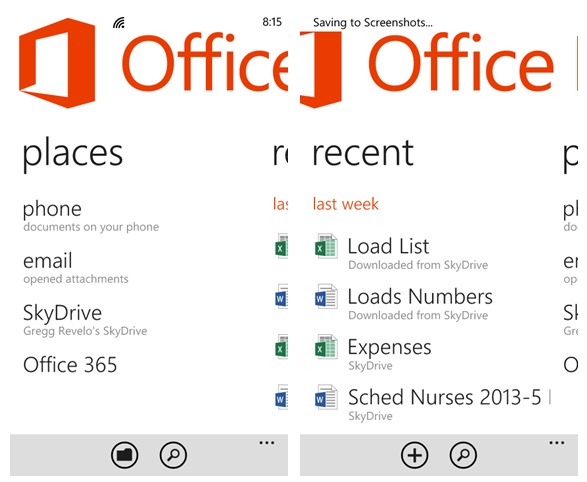
Mobile office at its best, Microsoft made it sure that its very own Office Suite gets a royalty treatment on Windows Phone. Office application enjoys the same interactive and smooth interface fully connected to email, SkyDrive, Office 365 plus a SharePoint where users can add as many sites as they want. I like the SkyDrive connectivity a lot since I can easily port my work files to the phone.


I couldn’t find the option to create a PowerPoint directly on the phone though, only blank Word and Excel plus a few templates.

One Note on the other hand is an application where users can take new notes and open existing OneNote notebooks. Notes can help users remember things like what happened in a meeting at work or things to do. Users can even record an audio note if preferred just like what I usually do. Best of all it automatically sync to SkyDrive for back-up where you can access or edit in any compatible devices.


Music and Video

Unlike the Lumia 820 and 920, the 720 doesn’t have the critically acclaimed Nokia Music app with Mix Radio, the phone instead had a Windows Phone proprietor audio player combined to video player under music+audio tile.

Opening the tile brings out the Collection page where music, video, podcasts and link to the store is shown. A swipe to the left shows the History of all your previously accessed files, another swipe to the left is the New page showing all latest added files, then a swipe to the left shows all the apps related to entertainment, then finally a swipe to the left will show the Xbox page where the music store and artist spotlights are shown.


Opening the Music link will show the Artists in alphabetical order, a left swipe will show the Albums, Songs, Playlists and the last left swipe is for Genres. I supposed the most used page among the aforementioned is Playlists so Microsoft should put it on the opening page instead other than Artists.

Music Player page on the other hand looks very cool, its capable of showing an image of the artist on the background, with his name, the title of the song, album cover and the smallish-ly weird like, random and repeat button on the right side of the album cover. Weird because the music page still has a lot of empty space yet Microsoft opted to put a small buttons for it. The page by the way is capable of side swipe commands for forwarding or backwarding tracts.


Users can also create a playlist directly to the phone under the options page, though editing them after saving is impossible to do. Still the best way to properly create and edit playlist is via Windows Media Player on PC. Also, music files on the memory card cannot be detected by the phone; it needs to be sync via Windows Phone App or Zune software.

There is also an option to adjust music player's equalizers, balance settings, presets, etc., though cannot be access directly to the music page other than the phone’s settings under audio. Microsoft should add a shortcut button at least on the page for easier access.

In terms of video player, the phone recognizes multiple codecs like DivX, Xvid, H.264, H.263, RV, 3GPP, MP4, FLV, etc. There is also a Dolby Surround Sound feature but it needs a Dolby compatible headphone to be fully enjoyed like Nokia Headset WH-208 of Nokia Lumia 920 and 820. The phone only had WH-108 out of the box.

Games

Windows Phone had the best gaming platform in the industry. Xbox Live offers a clean and cool graphic-rich interface, great games, secure payment system, easy online gaming connectivity, etc., aside from the fact of course that it’s interconnected to the Xbox community adding social glare to it. Even with its reduced Qualcomm MSM8227 processor, Dual-core 1 GHz CPU and Adreno 305 GPU, the phone still handles game graphics fairly, though had no access to heavy 3D games in the store. A lot of moderately graphic pnes are available though.


I have again noticed that the phone just like the Lumia 920 doesn’t have a pre-installed games on it. Free games made by Nokia could be downloaded on Windows Phone Store under Nokia Collections like Nokia Climate Mission, Word with Friends and Draw Something, they could have at least downloaded them out of the box. Then there’s also free Xbox games made by Microsoft Studios like Minesweeper, Shuffle Party, Wordament, etc. I specifically mentioned pre-download here because not everyone had Wi-Fi connectivity or unlimited data, it would definitely cost users much if they have to download this games individually.


I also find the games on Windows Phone Store a bit expensive compared to other systems. Maybe because it was Xbox customized but it would have been so much better if Microsoft would bring down these prices a bit.

Wrap Up Part 3

Work and Play were adequately addressed on the phone. Work with the phones top of the line office and connectivity suite, and Play with the best entertainment features like music, video and games. There were still bunch of things that needs to be improve though on the phone most especially on the entertainment features. Third party apps offering alternative music and video players were no better than the proprietor so users will have to settle for the setbacks. How I wish Windows Phone lets go of all the restrictions to developers in enhancing 3rd party apps, I would love to see a floating video screen on the phone or limitless video codecs support just like on Androids.

The Nokia Lumia 720 Journal Part 1: Beyond Dreams
The Nokia Lumia 720 Journal Part 2: Beyond Illusion
The Nokia Lumia 720 Journal Part 4: Camera and Beyond (Day Shots)
The Nokia Lumia 720 Journal Part 5: Camera and Beyond (Night Shots)
The Nokia Lumia 720 Journal Part 6: Camera and Beyond (Video Test)
The Nokia Lumia 720 Journal Part 7: Beyond Apps
The Nokia Lumia 720 Journal Wrap Up: Beyond Compare, The 7-2-0 Reasons To Consider

More Lumia 720 features coming up, stay tuned!

May 10, 2013

Nokia Lumia 720: A Perfect Mothers Day Gift

Because she is unique and because she is the best in the world, this Mother’s Day, give your mother the best gift that can keep up with her busy lifestyle and let her do what she loves best – the Nokia Lumia 720.

On-the-go moms can get lots of work done with the Nokia Lumia 720. This smartphone can stand for long hours as it has 2,000mAh battery power. Its vivid responsive touch screen allows her to easily browse through her contacts and other work-related applications. The Nokia Lumia 720 screen is protected by scratch-resistant Gorilla Glass so she can confidently bring it anywhere for work or family-related travels.

The Nokia Lumia 720 lets mommy fashionistas stand-out more with its slimline unibody design in bright colors. She will love the HD front-facing camera with a wide-angle lens that is perfect for self portraits and fashion photos. She can have extra fun with the Lumia exclusive digital lens Glam Me, which allows you take photos of yourself then add star treatment by whitening teeth, tanning your skin and many more. Nokia Lumia 720’s front-facing camera is also perfect for squeezing all your friends into one shot, as well as for chatting on Skype.

Likewise, moms who love to take pictures will find Nokia Lumia 720 as her buddy. With a 6.7 megapixel camera, Carl Zeiss optics, and f/1.9 aperture, she can capture great images and videos even in low light conditions. Bring home many memories with the whole family with downloadable apps like Nokia Smart Shoot. A single click will take 5 different photos enabling you to choose the best one you want to keep. It even lets you remove unwanted elements from your chosen photo.

Adventurous moms can easily discover hot new destinations with Nokia Lumia 720’s HERE Maps with Live Sight. Simply hold up your phone to reveal all the shops, restaurants and business around you. Also, get instant reviews and directions so you will never be stuck deciding where to go next.

Techy mothers will also treasure the Nokia Lumia 720 because it is powered by a Windows Phone 8 operating system. With customizable home screen, and easy access to contacts and to all her latest social network updates at a glance, she can stay connected to the things that matter most to her. It also includes free and native Microsoft Office files to edit Word, Excel and PowerPoint on the device so that she can balance easily her professional and personal life.


Make your mom stand out with a new Nokia Lumia 720 in yellow, red, cyan, black or white. Suggested retail price is P14,590 and now available in all Nokia Stores nationwide.

May 7, 2013

The Nokia Lumia 720 Journal Part 2: Beyond Illusion

A well-built device with competitive specs doesn’t have to be expensive; the Nokia Lumia 720’s hardware proves that more than anything beyond dreams, on the other hand, expensive phone doesn’t also mean its well-built and the Samsung Galaxy S3 proved this in actuality, but buying a phone doesn’t confide with hardware alone, the system running it is also equitable. Now, I have mentioned in the first part of this journal that I expected a cut in the phone’s software and system performance; how did it go? Read on to find out.

User Interface

Booting the phone up gives me sense of home-ness having used Windows Phone 8 on the Lumia 920 for more than two weeks; sense of familiarity definitely to the wonderful software features and user interface besides the fact that it offers the easiest way around among the current touch systems in the market from phone configurations to mechanisms making users enjoy the most of it as oppose to Android where it needs to be hacked and reconfigured to make it most usable.


One of the biggest strength of Windows Phone system is its top notched interface, the benchmark of all operating system in terms of fastness, smoothness, fluidity and stability transcending beyond processor its being run to, dual core or not. It’s beyond illusion in the Windows Phone system that mass market consumers cannot enjoy the best interface they deserve as opposed to Android where it gives users a laggy and clunky interface when being run on a low processor phones as if hit by Parkinson’s disease, no offense to the patients and their family.

To differentiate its performance to the Lumia 920, I’d say they differ much on fastness, fluidity and smoothness with the phone having no PureMotion HD+ that adds to the sharpness and display response of the screens but no difference when it comes to stability. Some apps open a bit slower on the phone, while there were some delays in the transitions, barely noticeable mostly though.


Customization is one of the key aspects of user interface. I personally believe the best interfaces are those that can be fully conformed to user’s preference banking on the very fact that people in general were created distinctively. Just like in the Nokia Lumia 920, Microsoft introduced several features on the Windows Phone 8 by improving the Menu tiles - from a two size tile set-up, it’s now capable of creating smaller ones making it more manageable, by adding new accent colors to it; by adding more lock screen background where users could use either the phone’s gallery, Facebook, CNN, from the Bing collections (my personal favorite), among the rest of the supported apps; and by adding a support for personalize ringtone via applications like Nokia Ringtone Maker that could create one and have it assigned via Settings.


Still missing though was the software’s ability to add message alert tones; hopefully Microsoft or Nokia would tweak the system further to allow the use of personal message alert tones. This specific feature had been enjoyed by mobilephone users in other operating systems for decades now.

These among all the changes in personalization were quite remarkable, but overall, it still fell short to the customizable prowess of Android and Symbian.

Display

Perhaps the most noticeable cut down made on the Lumia 720 is its screen display, the IPS LCD with ClearBlack Display technology that exudes a bright and clear display but noticeably grainy and pixelated with flushed color intensity. Even so, the phone had the best screen display among its counterpart at the same price point. Perhaps its edge over the Lumia 920 on this area, the side angle view, it gives out high intensity and brightness when tilted in any direction.

People Hub and Me Tile

One of Windows Phone’s biggest advantaged over its competition is its being a people centered system, well, this is very prominent in People Hub and Me Tile. In other operating systems, these features were just considered simple phonebook or contacts app, in Windows Phone, it is the device’s main backdraft of almost all application, adjusting and conforming to it. Through both apps, users gets a full view of everything around them like updates from people that matters must on Facebook or Twitter; emails from significant others; or events that will mark memories till eternity. It’s like a huge window of the user’s life, in a cosier, sleek and advance way.


From the primary contacts page, a swipe to the left will show the Tweets and Facebook updates from contacts, another swipe to the left shows recent activities of saved contacts in live tile form, another swipe to the left were the Rooms and Group contacts. These Rooms could be used to cluster contacts by invitation where users can chat privately or share calendars, photos, videos, notes, among others. Groups then are clusters of contacts that can be freely created to track each and everyone’s social network updates or message into one view. It doesn’t need invitations but users cannot share private stuffs with members unlike the Rooms. Both of course could be pin in the Menu for easy access. I love both of these features a lot.


Me tile on the other hand like the People Hub is a personalized windows to users world both real and virtual, but if People Hub lets users follow updates that matters most from friends, Me tile focuses on chat replies from messengers, tweet mentions, replies and direct messages, Facebook shoutouts, likes, and messages, among others, all accessible in one place. Users can also send message directly to social network supported sites all at the same time.


Call and Messaging

The Lumia 720’s telephone features were Nokia enhanced offering loud and clear voice calls paired with a loud ringer edging the flagship Lumia 920. Perhaps Nokia added a better quality speaker on the phone or tweak something on the software but in either way the big boast help me a lot in tracking all my call and text messages on time.


Messaging on the other hand was connected and covered well enough on the Windows Phone 8, the intelligent input mechanism, the conversations view, the Facebook chat integrations, manageable virtual keypad, among others.


Perhaps another proof why I consider Windows Phone a user focused system was its constant and intelligent adaption to people’s communication behavior. I never had a problem conforming the phone to my local dialect as it save words continuously, and then applying it perceptively to my writing style via autocorrect; a mechanism far better compared to Androids or iOS.


I would want Microsoft to improve it further like adding a search button at the Threads page so I don’t have to scroll down and search all thread one by one. As much as I find its virtual keypad convenient on the phone, one hand used is still challenging. It would really help in a huge way if SWYPE will be ported to Windows Phone 8 because the app would address the issue on one hand used at the same time offering a fast and convenient text input to users like no other yet.

There was another way though to send text or message easily via Speech Recognition Service, but there is a catch, it only supports limited language and that user’s needs to be constantly connected to Wi-Fi or Data before it could work perfectly. The service also allows users to hear received messages, reply to it or call the sender without touching the phone. I’m a huge fan of this feature specially when I’m walking or riding a bus or jeepney because I don’t need to take my phone off my pocket when someone text or when I need to reply to it, my voice does all the working via an attached headphone.


RAM and Storage

RAM or the Random Access Memory is a form of memory storage used to store temporary programs that are currently being executed. The Lumia 720 had 512MB of this memory making it vulnerable to limitations set by a few applications needing a bigger RAM to run smoothly. How good or bad is this, well, let’s just say that few apps like Temple Run and even the Nokia Lumia exclusive ones like the Nokia Music and Nokia Xpress Browser cannot be installed on the phone. I’m not aware of any other apps yet but I will make mention of it as the journal progress.

Well, I’m pretty sure Nokia and Microsoft are doing all it can to have these heavy running apps compatible to mid-range phones because the more users they reached, the more income they will generate.

The phone’s external storage is 8GB, quite enough I would say base on my geeky lifestyle and if this wasn’t enough, a 7GB of cloud storage was up for grabs as well via Sky Drive.


Part 2 Wrap Up

I have covered quite a bit of the phones software, so far my aforementioned title about illusion had been fairly address by Nokia and Microsoft on the device delivering top notched features and specs that’s within the reach of mass market consumers.

The cut backs on the other hand cannot be denied but barely affecting the phones overall package because in whatever scenario it could be compared to against its competitors on the same market bracket, the phone edge them a lot. More revelations, social and chic features are yet to be uncovered in the upcoming coming journals, stay tuned!


The Nokia Lumia 720 Journal Part 1: Beyond Dreams
The Nokia Lumia 720 Journal Part 3: Beyond Glimpse
The Nokia Lumia 720 Journal Part 4: Camera and Beyond (Day Shots)
The Nokia Lumia 720 Journal Part 5: Camera and Beyond (Night Shots)
The Nokia Lumia 720 Journal Part 6: Camera and Beyond (Video Test)
The Nokia Lumia 720 Journal Part 7: Beyond Apps
The Nokia Lumia 720 Journal Wrap Up: Beyond Compare, The 7-2-0 Reasons To Consider

Related Posts Plugin for WordPress, Blogger...