Showing posts with label .Nokia C7. Show all posts

Jan 2, 2012

Top 5 Most Read Articles of 2011

I did it again!! 382 blog posts in the 365 days of 2011, another milestone to be proud of being the only writer and editor of a blog created and maintained out of passion amidst a busy lifestyle. I just got 2 jobs, Law school and a few business sidelines to balance, so its not that obvious . As it was 3 years ago, my goal has always been sharing ideas and thoughts, never monetary or number of visitors or page views, but glad to know that everything was quadrupled this year with the most, hitting 1000 page views per day from just 1 or more in 2009. A big thank you for visiting the blog, glad to know that I was able to reached and help more people this year.

So back to the blog title, which articles were the most viewed this year and why is it viewed more than the rest? Link
1. Price Match: Motorola Defy vs. Nokia C7

I posted this article on January 13, 2011 which is so far the current Top 6 in the all time high list. The reason for this I guess was because both phones were offer in the same bracket in most parts of the world until now so the interest had never faded for both. If people see a Nokia C7, a Motorola Defy must have also been on the category or vice versa so they tend to find the difference online.

2. Know The Best Apps On Your Mobilephone via topApps

Posted on May 10, 2011, the article is currently on Top 9 of the All Time list. Nokia's official twitter account link this article up on Twitter and Facebook thats why it gained so much views. A huge thank you to Nokia for sharing it!

3. Nokia X1-00's Loudest Specs

The phone is no less than the most popular from Nokia so it wasn't surprising to find out that its on the list of the most read blog article of the year. The phone was marketed as having the loudest speaker of all so the interest of people was very high.

4. Nokia C7 Chronicle: A life with Anna Day 2

So its another C7 article alright, but this post was linked and featured by WOMWorld Nokia gaining a lot of audience worldwide thats why it made a huge impact on the scale. I wasn't really expecting this to do big because C7 was already a little older when the post came out but I was wrong, a lot of people were still interested on the phone and wants to know more about it specially with a Symbian Anna upgrade.

5. Nokia E7: The First Imprint

I believe, I was just lucky enough to have been among the earliest user of the Nokia E7 around the globe thats why the article gained a lot of views. Its a norm that when something is on hype, people tend to learn more about it. The Nokia E7 came at the right place at the right time.

So there you go folks, the most popular articles of the year. They were all mobilephones, so I guess my madness for the said devices must be continued to retain my current readers at the same time I also need to diversify further to other topics to reach out to more people.

Its a continues trial and errors for me here with a goal set, world domination!

Nov 29, 2011

Tap into something new on Nokia Phones with NFC

Get ready to experience the easiest and fastest way to connect and interact with other devices as Nokia introduces Near Field Communication (NFC) in its new range of smartphones!

NFC is an innovative technology which allows contact-less data exchange between two devices in close proximity to each other. It makes it easy for your phone to instantly pair, share and tag with other mobile devices and accessories through a simple tap!

Share your favorite photos or videos with friends and family or pass on contact details quickly with just a tap on the phone you want to pass it to. Enjoy the best musical entertainment alone or share in a party by pairing with compatible headphones and speakers. Have hands free conversations while doing other things by connecting to a compatible headset.

Enter a whole new world of exciting content with NFC tags. Download the latest trailer or songs by tapping the poster you see on the street. Find out the color and sizes available for that must-have jacket with a tap on the in-store display or get directions to the coolest restaurant in town from its interactive ad.

Taking apps to the next level, NFC also allows you to feel the excitement of multiplayer gaming. Tap into the challenge of Asphalt 5 or Angry Birds Magic with your friends.

NFC enabled smartphones include Nokia 701, Nokia 700, Nokia 603, Nokia C7 and Nokia N9. Compatible accessories are Nokia Play 360 wireless speaker, Nokia BH 219 headset and Nokia BH 505 stereo headset.

For starters, enjoy convenient NFC service for your smartphones with Smart’s Tap Share program. Inquire about your prepaid balance or download mobile content such as news, music, and games by simply tapping on NFC-marked posters in select Smart Wireless Centers and Smart Stores nationwide. This means you don’t need to memorize lengthy keywords, codes, and URLs to enjoy Smart’s service.

To avail of Tap Share, existing Nokia C7 users can update their phone software by going to their phone’s update menu or by connecting their phone to their PC via Nokia PC Suite.

Ultimately, Nokia makes mobile experience more enjoyable and convenient with just a tap.

Sep 19, 2011

Nokia C7 Chronicle: The Disaster Wedding

The Nokia C7 Chronicle continues, Day 20 of Nokia C7 with Symbian Anna on board, a very busy day with a fully booked event schedule, Disaster Management lecture and Drill in the morning and a wedding of a co-worker's daughter in the afternoon. Well, the Disaster Drill is very important being a core area in the Benchbook Program while the wedding is equally important being given 1 of the most coveted 7 tickets set solely for the hospital staffs. But of course I'm only up to the reception and banquet after the ceremony. It was held in Bethany Gardens and Resort Ozamis City, not an impressive place but its the best that Ozamis can offer for couples with tight budget. Disaster in the morning, wedding in the afternoon, Disaster wedding in short. ;)

06:00 Hours, +8 GMT, September 15, 2011

As usual, start the day right by doing my morning chores. As I checked my social stream via Gravity, there's a commotion going in the smartphone world as news popped-in that Nokia Windows Phone will not be coming out until Q1 2012. Of course this was just a hearsay and I myself don't believe so having a great confidence that the company will release the phone as planned but will be in gradual phase, country by country. Well, I hope its indeed not true because it will be devastating for Nokia since the competitions were all set to release there own Windows Phone Mango by Christmas or earlier than that.

I did charge my Nokia C7 full bar and decided to test its camera and battery prowess since it will be subjected to 2 photo and power demanding events. Will the phone survive the ordeal?

07:30 Hours, +8 GMT, September 15, 2011

Left abode for work. The first power consuming application covered was the music player as I turn it on while traveling. I hooked my WH-701 earbud stereo headphone from my lust green Nokia N8 and blast it full volume. Nokia C7 has only WH-102 stereo headphone as a paired music accessory with below average performance so I have to take another headphone with me. I do suggest you get yourself a better headphone for the Nokia C7 if you're planning to buy the phone.

08:10 Hours, +8 GMT, September 15, 2011

Arrived early at work with a bit of excitement. Emergency drill would mean we get to try fire extinguishers, evacuation and even dodge on the fire trucks hose just like last year but we were disappointment to find out that the fire truck wasn't available and that we will only have to do a lecture on Disaster Management. We missed all the fun parts!

While waiting, I took a few snaps of what was happening around. The images produce by Nokia C7 so far were above average than typical cameraphones. Whats different with the phone was its focal length and aperture giving images a wider photo coverage than usual. The absence of auto-focus did manifest as shown on the first picture below where the announcement paper came out a bit blurry after a close range snapshot. The rest of the images were good given a better lightning condition.

Battery is still full as I checked.


09:30 Hours, +8 GMT, September 15, 2011

The lecture started and as planned, I took all the live prints that were happening. Well, glad that I did because the lecture was so boring. It was quite the opposite last year since we had all the actions covered. Just watch the faces of the people listening for proof.

Pictures.. I did get a few dark images particularly on the scenario's where I took the it against dominant light. If these were taken on a Nokia N8, flash would have worked. Also took a bit of videos to remind me in the future how boring it was, like really!


11:30 Hours, +8 GMT, September 15, 2011

Wrap the lecture up and it was indeed a disaster! Come to think of it, where just setting around and listening, and they call it a drill.

Battery checked, 3 bars down. The phone did drain fast with the use of the camera. I suspect it was due to the GPS tagging feature of the phone that automatically add coordinates to the image taken. It was more of annoying than helpful because it keeps on popping warnings on the screen that it can't detect my location. Well, I hope Nokia will provide option to turn this feature off.

12:30 Hours, +8 GMT, September 15, 2011

Change course and set myself up for the wedding. I was hoping that it can change my sleepy mode. I arrive in the church past 2 pm, wedding started at 1pm so it means that I missed the ceremony on purpose. I did went inside the church though and take a few snaps. I then went outside and fired the Foursquare using the network data to connect to the internet and checked-in. I do socialize using Foursquare and if your interested in adding me up, Click Here.

Battery Check, another bar down leaving me with only 3 bars left.


15:00 Hours, +8 GMT, September 15, 2011

After all the hustles and nuzzles, we finally arrive at the reception area. It was quite far from from the church so we have to travel. It actually took 20 minutes of our valuable time making everyone hungry and tired. Good thing that Bethany Gardens has Wifi signal so I got entertain a bit. I checked in using Fourquare again and checked my social stream.

I did another rounds of snapshots, this time in a low light conditions since the reception was indoors. Images weren't very impressive with lots of noise in the background. The flash sometimes illuminates to much that it overexpose images nor completely the opposite. I never had a perfect shoot in short.

Here are some of the sample images taken.


I did enjoy the reception because the food serve were unlimited. Its like we could eat our hearts out destroying my diet for the day. I also had a wonderful company so it was more fun and enjoyable.

Battery check, on the red bar. The use of flash is a big factor here as I suspect and also that the area doesn't have a SIM signal, so the phone keeps on checking and refreshing its status.

16:00 Hours, +8 GMT, September 15, 2011

Head back home and call it a day. I was very uncomfortable the rest of the night since I'm very full and that I felt guilty of what I've eaten. A day of disaster for my diet.

18:00 Hours, +8 GMT, September 15, 2011

Set aside my geeky lifestyle and face my Law books. I need to catch up with a lot of stuffs that I missed from my absent last weekend.

C7 also drained this time performing only within 9 hours from its last charge. Quite impressive actually after exposing it to a harsh ordeal. Most of the time, it last more than a day or two when used normally.

Sep 2, 2011

Nokia C7 Chronicle: A Life With Anna Day 3

Day 3 with the Nokia C7 with Symbian Anna and its thrice splendid. I'm still mesmerize by the performance boost of the phone overall. You can read Day 1 and Day 2 by clicking the link.

06:00 Hours, +8 GMT, August 25, 2011

Start of the third day with Anna, the most beautiful thing that happen for the phone. Not a pleasant morning though because I came to realize that I have less than two days to study for my Midterm exam in Criminal Law and Statutory Construction. Then a thought came to my mind, how can a Nokia Symbian smartphone help a striving student like me. Hmmm?

08:00 Hours, +8 GMT, August 25, 2011

Head to work rushing because I'm almost late. Its a bit of an issue on my part because no matter how early I woke up, I still end up almost late to work. Must have something to do with my Nokia C7 smartphone! Haha!

12:00 Hours, +8 GMT, August 25, 2011

Lunch time with the gang and also the best time to discover more improvements on the phone, these time the camera application. Maybe its just me but I really think that captured images of the phone's camera is generally better now compared to the old one, might be startled by the impressive system improvement overall but really...

On the other hand, without a doubt camera menu had been modified from the icons used to the arrangement of the menu and camera options, but no new camera features were seen and the Video capability did not change rather like the 30pfs HD recording capability on Nokia N8.

17:00 Hours, +8 GMT, August 25, 2011

The most exciting part of the day since I'm heading home, but not this time around because I have a tedious tasks ahead, my 450 page Criminal Law book coverage for Midterm Exam. I have to read at least 250 pages for the night so I can finished everything which brings me back to the question, how can a powerful smartphone like the Nokia C7 help me as a student?

On a fast note, the phone is a good social and communication device so I can easily connect with my classmates and professors. I'm also using it as a recording device, like when were having a class or discussion, the phones recording capability helps me review everything that was discussed and take note of those that I missed. My only problem was that the phone doesn't capture the my professors voice clearly from where I'm sitting so I have to figure everything up. If only theirs an app that can enhance the phones recording feature, it would be of great help. And that an app could do a voice to text feature so it could produce an automatic transcript of what was recorded.

A Law dictionary could also help because of the complexity of the words being use. The dictionary must include Latin being commonly quoted, and not to typecast the rest of the college courses, Nokia should focus on developing Dictionary specifically targeted to each.

I would really want to see an Optical Character Recognition (OCR) app on for Symbian which could recognize letters on pictures and transcribe them to words. How could this be very important? What if your on a library and you want to xerox a page in the book for reference and the xerox copier is not available, instead of writing it, users could take a photo of the page and let the OCR app transcribe the picture and covert it into text, no more jotting of notes. I should send this to Ideas Project!

20:00 Hours, +8 GMT, August 25, 2011

Turn my geek side off so I can start reading. I did place the phone near me so I can easily peep in if somebody text or call and that I could pop in the music player if I get a bit bored and drowsy. Being reachable though, the phone is a perfect distraction, what I've notice was that every time somebody text me and read the said text, I hop in to Gravity, Email and so fort so it takes away a portion of my time... who wouldn't be?

This will be up for now folks, more chronicles upcoming!

Nokia C7 Full Specs Here

Aug 29, 2011

Nokia C7 Chronicle: A Life With Anna Day 2

The Symbian Anna performed impressively well on my first day of trial. I didn't have the time to run through all the features and updated though because I have to retire early for a much needed rest.

06:00 Hours, +8 GMT, August 24, 2011

Need to wake up early to start my long day ahead. I usually do the morning cooking and that I have a niece who goes to school at 07:00 hours so I no choice but to get up early. Part of the morning routine of course is turning the WIFI on so I could connect my phone online to read the current news in the real and geek world, but my Nokia C7 drained overnight so I have to connect it to a charger. After gaining a bit of power, I turn the phone on and boot up but after awhile and to my surprise, I got a prompt "Start up failed, contact retailer" freaking me out a bit. I'm very sure that it has something to do with the firmware update and so I decided to reboot the phone.

To my relief, the phone load up and everything was okay. I thought the problem was serious and that I have to send the phone to a Nokia Care Center. My routine social checked went on while preparing breakfast. Well, I'm still using Gravity to do all my social routine check since it covers all social network sites like Twitter, Facebook and Foursquare, it could also handle multiple usernames and no other all-in-one social app can beat Gravity yet as to intuitiveness, savvyness and user friendliness. If your interested in following me, my personal twitter account is @gregg003 and the blogs official twitter account is @scratchepad. Under a different twitter account, I followed local and international news networks as well as tech sites.


08:00 Hours, +8 GMT, August 24, 2011

Hit the road to work and as what I usually do, my music player will play on the background. No visible improvements on this area so far, as far as I can very much remember. The speed of opening the music app remains the same, the features, menu and music capability among others.

12:00 Hours, +8 GMT, August 24, 2011

Lunch break and siesta a bit to relax from a scorching busy morning. It was also the perfect opportunity for me to play with the phone a bit and try to find more changes. Calendar feature has added a few new trick, like the (Tap to create entry) from the Calendar page , with most of the add-ons seen underneath the entry page. Users can now simply click the entry they want to create with a saving feature that has access to both phone and PC, Location feature as well as the ability to attach various files.

The calendar structure and design remains the same overall which I now find boring. I believe its time for Symbian to add animations here or at least change the design.

Then I did a few scroll on the Contacts with the prominent addition of the Microsoft Communicator feature. I'm not sure if this has similar features to that of the Communicator app on the Business devices but hopefully it does, though I don't know how this works. Help Nokia Team, at least show a video on how this app works.


13:00 Hours, +8 GMT, August 24, 2011

Back to office work. I'm a bit busy because I have to finish all the updates before the months end. This was suppose to be due last July but I got very occupied with a lot of stuffs lately that I need to do an abrupt adjustment to balance my work, studies and this blog.

17:30 Hours, +8 GMT, August 24, 2011

Got back home and hit my workout routine. Yes I have to squeeze this in if I want to continue losing weight. As soon as I get home, the phone got connected online for the rest of the night. As soon as I had my dinner, I allocated a bit of time to write my blog post for the next day then decided to hold my study schedule for a night and focus on the phone.

I love the messaging mechanism of the phone now with its portrait QWERTY, though the buttons were a bit small as compared to the landscape version. The precision was impressive that I now enjoy texting on a touchscreen for the first time. Plus the fact that its coupled with SWYPE, a text input mechanism that implements one continuous finger motion across the screen keyboard, messaging became easier than I imagine it to be. You might think that this SWPE app is only applicable in English, its not, it has a feature that will save the words you often use even in your local dialect. I like this a lot, lot.

Photo viewer applications has a little revisions particularly on the lower tab as seen on image below and the sharing option which will direct automatically to Facebook.

Among the biggest improvement in the Menu features was the Nokia Maps application which is now running version 3.08 that added a lot of new features from the already feature-packed older version. The Check-in feature was added, the Drive, Guides, Map Loader and the Weather were just among the major updates. I will be featuring a detailed posts on this in the coming days so stay tuned for that.

What else, Nokia Social was updated but up to now it still doesn't level up with the best in the market like Gravity and that Nokia is still not offering a network package for these like Blackberry does with its Blackberry Social. Well, if Nokia is dead serious in the social space market, then this is a must move that they should take as the landscape of cellphone mobility had now shifted from simple call and text to social networks like Twitter and Facebook.


And I can go chat onwards all day long but let us not dive into that for now, my hot Nokia C7 chronicle continues tomorrow. Stay tuned!

Aug 28, 2011

Nokia C7 Chronicle: A Life With Anna Day 1

18:00 Hours, +8 GMT, August 22, 2011

Got my confirmation from Nokia that I can now download its latest and greatest Operating System upgrade of Symbian^3 dubbed Symbian Anna and in no time download it over the air (OTA) via WIFI. Downloading takes for about less than an hour which will then prompt users install the operating system that will also take another few minutes. Then after the reboot, bunch of software updates will be prompted for download which will take another hour to download and install.

Gone were the days when the upgrade is via NSU were users will have to manually connect the phone to pc and pray that nothing goes wrong because one wrong move will damage the phone forever.

19:30 Hours, +8 GMT, August 22, 2011

Got the first glimpse of Symbian Anna on my phone with a white middle rotating circle loading mechanism. This will open the Log-in procedure to all services that users were currently subscribe which in my case, all Nokia services, then after which the colorful Homescreen opens which now have transition effect’s making it more lively, barraging new youthful icons. On plain view, everything looks fresh, simple and delightful.

Just like any other users who got hold on the touchscreen phone, side swipe in between Homescreen will be the first gesture that I did, and the Symbian Anna’s swipe interface gives users a notion of fastness because of the new slide mechanism that was implemented even though it registered the same time of completion as that of the Symbian^3 in my observation. I call it a half slide full acceleration implementation rather than the across the screen full finger slide. The swipe mechanism was the key here which came out very effective.

Then I did a fast run through to all areas of the phone and found quite a few new applications installed. On the Office folder under Applications, Communicator icon appeared which is very common among E-Series devices being a business related application. Notification also pops out on the Applications folder which I believe will list all important updates of the phone. Then the NFC related applications such as Share and NFC tutorials icon. Only the Nokia C7 got this feature among the current Symbian^3 phones so this will become its unique feature for now. Angry Birds Magic was also installed adding to the list of free pre-installed games on the phone.

21:30 Hours, +8 GMT, August 22, 2011

I was ready to send my very first tweet and status update using the phones updated Nokia Social App. Though I could not see any visual improvement on the app’s interface, the message writing mechanism of the phone became easier than ever with the new virtual QWERTY keyboard for portrait mode. I have never enjoyed the use virtual keyboard before than now because of the accurateness I get from the current keyboard. I even start to enjoy Swype now because of the said keyboard.

Dug down further to individual applications which have reportedly been upgraded trying the new Browser first being one of my most used phone feature. Well. I have to say that it was indeed a lot better than the previous cutting the loading time to almost half. Just like the Safari browser on iPhone, the phone‘s browser will open a customize mobile version of any webpage first with an option to access the full webpage afterwards. But either which, the browser is blazing fast in rendering pages.
Messaging has always been a strong area from Nokia, and the phones Nokia Messaging feature just got even better nowadays with a full image rendering.

23:00 Hours, +8 GMT, August 22, 2011

Hit the bed early since I still have to recuperate from my sleepless nights brought about by our exam last weekend. Things are getting better so far for Nokia C7, my chronicle continues as I discover more features of the phone and stay tuned for my upcoming re-review which will be due in a weeks time.


Aug 22, 2011

Nokia C7 Chronicle: Day 136

I have with me my Nokia C7 for almost almost 5 months now, times flies fast as the saying goes specially when your enjoying every bit of it.

When I received the phone few months ago, it was more like a reliever device from the longing that I felt after my Nokia N8 and Nokia E7 trial experiences. I had this perspicacity that at least, I have a phone that has the same user interface and operating system that of the two heavyweight smartphones, at least I can do these and that rather than nothing at all, at the same time a consternation that it will never be any better than the two. In short, the phone was a mere overt to the reality that I cannot own my dream devices, Nokia N8 and E7, and I have to settle for less and just be happy about it.

Well, I was definitely wrong on this notion because after having used the device, I could say now that it has a class of its own that held it unique from the rest.

Style is definitely the main attraction of the device, it has a unique enigma that would make me want to look at it and touch it often, that if I want to spend the rest of the day in style, the phone will fit best, that when I need a Flashlight, its Dual LED Flash on the phone will come in handy, among the rest of its strong points.

136 days had past and my Nokia C7 still looks great, some dust accommodation the phones edges, a few hairline unnoticeable scratches among the rest of the normal wear and tear of a heavily used gadget. Some worth noting scratch prone areas were in the shinny plastic bulge of the speaker area which I consider a design flaw, on the plastic cover of the mechanical buttons at the bottom and in protruding plastic camera fringe at the back. These areas needs to be covered with protective case or something.

Software-wise, after a hundreds of upload, downloads, application installation and uninstall, the phone remained stable. Did I not mention on my previous blog posts that my Nokia N8 hanged up on me that I need to reboot it thrice? I had never encountered such on the Nokia C7 that I can freely say that it has more stable software than the latter.

Though unlike the Nokia N8, the C7 doesn't have the smooth interface, it lags sometimes in registering touch commands specially when the phone is connected to a charger. Other than this, the phone is a power device performing the best of what it does.

Day 136 and the phone is about to enter another chapter of its gadget life as I'm about to upgrade the phone to Symbian Anna, the long awaited upgrade that will bring lots of improvements on the device. I will be writing my experience with the new operating system in the next few days, a blow and blow account on the new features and enhancements capping it off with a re-review of the phone.

C7 connected to the Ovi Suite now and a few clicks away from rebirth.... ready, set and here we go!

Aug 19, 2011

Symbian Anna Rolling In.. Finally!

Symbian Anna, the most awaited Symbian^3 upgrade starts to roll out! I have just posted an article about this 4 days ago and Nokia answered back with a surprise release 10 days before my predicted date.

At the moment, feedback's were coming in from Europe and Asia enjoying the said upgrade but not here in Philippines yet as of post time, might be in a few days.

I'm more than excited to test this out and share my thoughts.

Symbian Anna key features:
- Virtual portrait QWERTY for fast, one handed typing
- Split screen view while typing; so you can see message threads, webpages, contacts or email
- An easier to use and faster browser, delivering quicker page loads and improved navigation
- Refreshed Nokia Maps including simpler search, new public transportation routes and the ability to check-in to Facebook, Twitter, Foursquare or local social networks
- A feature to share your location via email and SMS (even to non-Nokia phones)

Features for business users:
- Instant messaging and presence with Microsoft Communicator Mobile
- E-mail enhancements including full meeting request support
- True business grade security with hardware accelerated encryption
- Easy and secure intranet access for business users who want to access their company intranet

My Nokia N8 gets continuous auto-focus in video recording plus a higher video framerate (30fps), while the C7's NFC capabilities are also finally enabled.

Aug 17, 2011

Promotional Videos For Nokia E7, N8, C7 and C6-01 with Symbian Anna

The Symbian Anna upgrade seems to be unstoppable now as Nokia loads promotional videos for the Symbian^3 carrying device's. Well, it's about time since that upgrade is due past its target. As I mentioned in my article yesterday, I expect a lot from this upgrade and I do hope it meets my expectation.

The video would also mean that all the current aforementioned phones will now be carrying the Symbian Anna.

The videos went live silently on youTube few days ago but whats interesting among the videos were the number of views they currently have at the moment. The views could automatically correlates popularity with the most viewed as the forefront of the race.

Base on the current tally, the obvious prevails, N8 is still the flagship as to popularity among Nokia phones with 37,155 views followed halfway by C7 with 14,171 views, then the E7 with 12,663 views and finally on far fourth, the C6-01 with 7,542 views. I believe that the Nokia N8 is also the frontrunner among number of units sold.

And so without further ado, the aforementioned the Symbian Anna-nized videos.

Nokia N8


Nokia C7


Nokia E7


Nokia C6-01

Jun 18, 2011

Win One Of The Nokia E7's and C7's By Just Downloading On Ovi Store!

Download anything and everything you can find from Nokia's Ovi Store, themes, games, apps, audio, or video FREE from June 16 to June 29, 2011 and win for yourself a most powerful business phone to date, the Nokia E7 and the stylish powerful, Nokia C7.

This is the easiest and the craziest contest that Nokia Philippines ever had since all you have to do is create an Ovi Account, register on Nokia Ovi Store, fill up the Ovi Store promo form and your ready to go. Each download will serve as a raffle entry.

Ovi Store Promo Mechanics

1. The contest is open to all registered Ovi Store users and interested non-registered consumers.
2. Non-registered consumers must go to Ovi Store (http://store.ovi.com) first and register using his email address to get an Ovi account.
3.Once registered in Ovi Store, registered Ovi Store users must log on to the promo website www.nokia.com.ph/OviStorepromo and submit his Ovi username, first name, last name, address, mobile number, and email address that he used to register his Ovi account to officially qualify for the raffle promotion.
4. After completing all registration requirements, he can download as many apps, themes and games. Every download is equivalent to one raffle entry.
5. Downloading period is from June 16 to June 29, 2011.
6. Downloading games, apps, and themes in Ovi Store is FREE.
7. Raffle winners will be determined on July 6 via electronic raffle at the Nokia Philippines office, 40th floor Philamlife Tower, Paseo de Roxas corner Ayala Ave., Makati at 3:00pm and will be announced on July 7, 2011 through the website.
8. Participants can only win once during the promo period.
9. There will be seven (7) winners of a Nokia E7 and seven (7) winners of a Nokia C7 smartphone. The winners will be notified via registered mail regarding redemption details. They will also be contacted by a Wunderman Philippines representative thru their mobile numbers.
10. Prizes may be claimed at the Wunderman Philippines office, 9/F Marajo Tower, 312 26th Street cor. 4th Ave., Bonifacio Global City from 9 a.m. to 6 p.m., Mondays to Fridays.
11. All prizes of provincial winners will be sent to the winner's mailing address via courier. Courier costs will be shouldered by Nokia Philippines.
12. To claim their prizes, winners must present the following:
Notification letter from Wunderman Philippines.
One (1) valid ID with picture or birth certificate of the winner.
13. In case the participant will not be able to claim the prize, he can have a representative come to the Wunderman Philippines office for prize pickup.
14. The winner's representative must present a valid ID (Philippine passport, driver's license, valid ID with picture, etc.) and an authorization letter from the winner along with the winner's valid ID.
15. Period of redemption shall be within 60 days from receipt of notification. If not claimed within the given period, the prize shall be forfeited in favor of the sponsor prior to DTI approval.
16. *20% tax for the prizes exceeding P10,000 shall be shouldered by Nokia Philippines.
17. Prizes are not transferable nor convertible to cash.
18. Employees of Nokia Philippines Inc., Wunderman Philippines and their relatives up to the second degree of consanguinity or affinity are not qualified to join the promo.

So what are you waiting for, CLICK HERE to create and Ovi Account then CLICK HERE to Join the contest!

I'll definitely be wrestling for downloads so I could win the luscious Nokia E7! c", Good luck to us!

May 23, 2011

Nokia C7 Protective Cases, Which one to pick?

So you have bought or planning to buy the most stylish superphone in the market and want to add a bit of safeguard to it, what would be the best protective case you should grab to provide extra protection you aim for your most prized possession.

Unlike the Nokia E7 or N8, the Nokia C7 is not blessed to carry the anodized aluminum case, meaning, no matter how careful you are in using the phone, it will wear and tear in the long run with scratches as the most common concern as it is only made up of high grade plastic overall. Having a protective case is more than necessary if you are planning to use the phone for a long time.

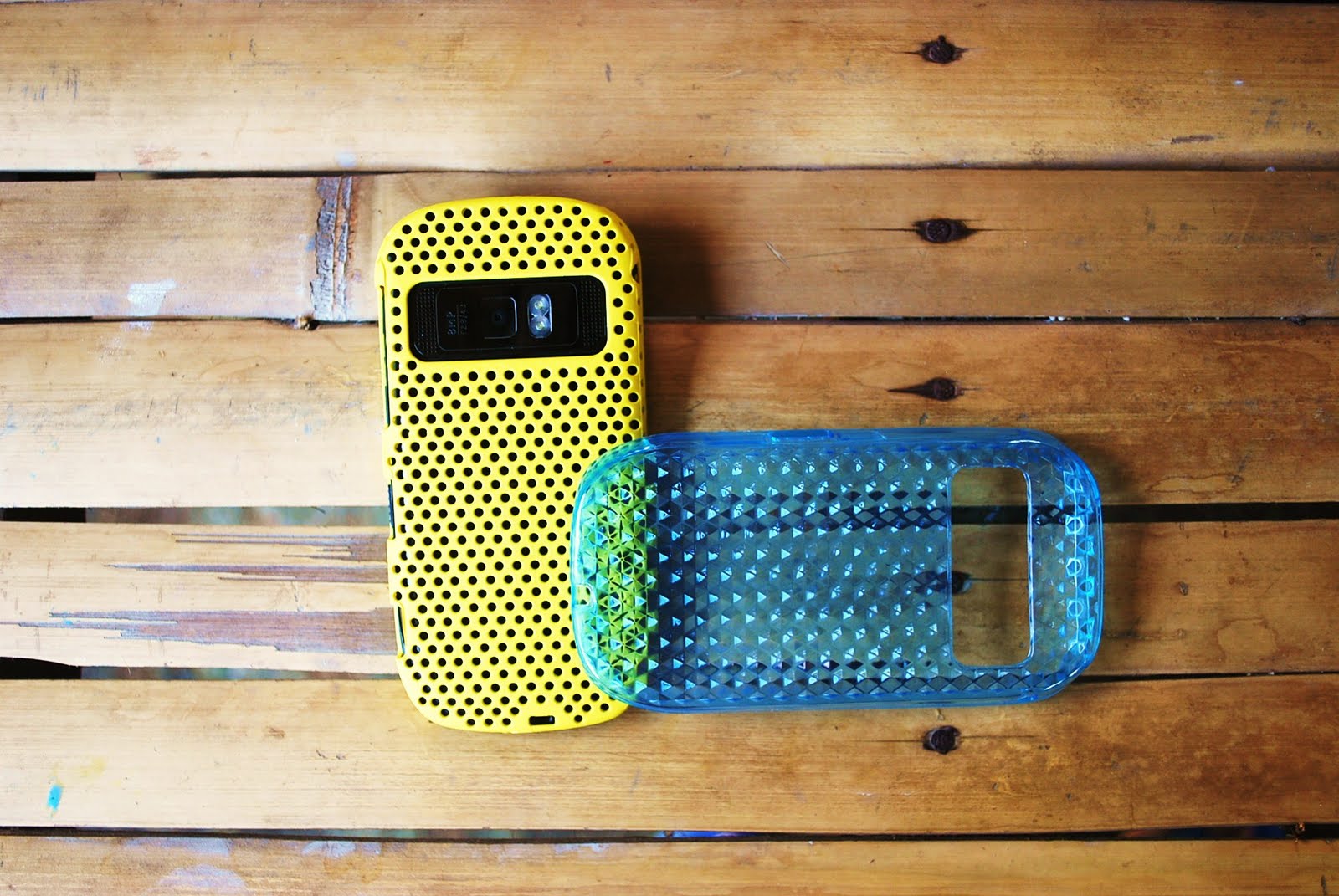
So back to the question, which one to pick and why? Okay, currently, there were 3 available cases you can chose, Gel Silicone Case, Leather Case (Bi-Fold or Flip Top) and Plastic Perforated Mesh Net.

The Gel Silicon cases cost at around PhP150 to PhP1,200 depending on the brand, the cheapest were the brand less ones but the problem with this type is that it thickens the dimension of the phone eliminating its beautiful thin design and worst of all, it bulges on the side making the side buttons difficult to press. The advantage on the other hand, it will protect the phone best against accidental fall as the soft gel counters the impact. The Capdase brand though is better because its thinner and that the side cuts for the buttons have wider margin making it easier to press, the problem with this one is that it’s very expensive.

The Leather Cases (Bi-Fold or Flip Top) cost at around PhP300 to PhP500 depending on the supplier, I have not encounter any branded types yet for Nokia C7 phones but it will surely have one. Advantages of these types of cases, better cushion since beneath the leather cover is a thin foam. The device will be clasp by a plastic holder glued to the leather cover. The disadvantage of these types of cases, it will make the phone very thick and that the plastic clasp will detached for some time.

But if you’re looking for a stylish cover to go with your stylish looking phone, then the Plastic Perforated Mesh Net Case is the best protective case for you. This cover cost at around PhP130 to PhP350 depending on the supplier. Other advantage of the phone aside from being stylish is that it’s thinner and so the side buttons usability is not affected. Disadvantage of this types, less cushion since it plastic, it will eventually break in due time and it gets dirty when use for some time. This case is only good to protect the phone from scratch. My advice if you are to buy this case, buy the dark colored ones and never allow it to drop.

So there you go, the 3 available protective cases available for picking. Choose the best one that suites your taste.

May 3, 2011

Nokia C7, The Software Talk Part 2

The Nokia C7 Software Talk Part 1 started with the operating system as a whole, touch experience, messaging, web and social connectivity. Part 2 will tackle the rest of the software side and my concluding thoughts. Click here for the Part 1 backtrack.

Music and Audio

Like the rest of the Symbian^3 devices, Nokia C7’s Audio player plays top of the line music but unlike the Nokia N7 or E7, the phone is supplied with a regular earphone which could be easily be distinguished against the crisp, clear and dip sound of an ear bud type headphone. It works fine though, the loudness is decent with the Stereo Widening and Bass Booster. Much better of you paired it with ear bud headphone.

Stereo Speakers was not that loud and it’s not the loudest among the phones that I tried. Let say my old Nokia 6233 is even louder and bass dipper. Music Player supports MP3, WMA, WAV and AAC+ files.

Music Menu is top notch, it is one among the best feature of the phone. Opening the music application unveils the music menu which lists down songs by album and artist. Scrolling through the album by artist menu implements a combination of a very smooth interface and fast album cover side swipe with added cool 3D effect. User could also access songs by genre or playlist or directly shuffle all songs on the list.


Opening the music file brings out a music player panel that has a striking huge album cover on top with regular size music controls on the bottom. I’m a huge fan of these feature, it fully utilizes the screen size making it very pleasing to look at. In this panel, you can access several options to shuffle play, repeat play by song, album or playlist, access song details, share ito everyone via FM transmitter, access equalizer and settings among others.

The Radio player was a typical among Nokia phones, lively and interactive. It has RDS which is capable of getting information via internet including time, station identification and program information. Visual radio effects make the experience enjoyable and as a norm, can only be played with a headset inserted.

There were only a few phones with FM transmitter at the moment, a cool feature that can only be enjoyed by a few. It gives users a way to share music in a fun way like when you’re in a car or when your peers were a few meters away.

Video Playback

The video player on the Nokia C7 is no less than the best in the market at the moment, it works perfectly well on every possible video codecs that exist at the moment. DivX, Xvid, WMV, H.264, H.263, RV, 3GPP, MP4 files etc, the phone plays them all flawlessly because its platform embedded unlike other operating system that needs a third application software to do so which could result to hangs, video to audio discrepancies among other problems. A fast processor from other competing phones cannot resolve the issue because it’s a compatibility issue particularly on Android phones.


Unlike the music menu, there were no big improvements seen on the video menu, no side swipe mechanism, 3D effects whatsoever, only additional shortcut widgets for Ovi Stores video clips and youTube. The last video watch was also a welcome addition except that it won’t continue on the last clip you’ve watched but instead play the video from the start. Thought video forward and playback is a breeze handling skips in an instant, thanks to the fast processor on board, I still prefer the automatic playback.

The Web TV is a prominent feature in the entertainment realm, it features links and personalized page to famous video sites such as CNN, National Geographic, E Online and Paramount Movie Teasers. More applications can be downloaded and installed in Ovi Store. There is no such thing as boring times with the phone, it just gives you unlimited video entertainment.


Camera and Video Recorder

One of the biggest asset of the phone compared to the rest of its competitors in the mid-range market is its camera capability, it has an 8MP optics with 3264 x 2448 pixels, fixed focus EDoF and dual LED flash, wide angle lens, geo-tagging and face detection. It is no less than the best camera specs to have ever been incorporated to a mobilephone in aforementioned market bracket.

The resulting images, quite pleasing photographs, the wide angle lens works covers more view than the usual, the higher pixel density could produce bigger image size, fixed focus EDoF gives quick snap shoot, dual LED flash illuminates dark areas and provides light when taking videos in the dark. Some disadvantage of the camera specs, EDof cannot take macro (close) shoots and the image comes out less colorful.


The phone also have editing features, users can add effects and tones that can be readily access. Other add-on includes the Ovi’s Panorama Mode and an option to add tags on the photo. Direct link to Share Online is still visible as well as an option to print directly to a kiosk.

Video capability of the phone is the front runner among mobile phones at the moment. It supports 720p HD quality video with 25 frames per second unlike any other phone in the market to date. The video has a fast frame rate with auto adjust focus depending on the subjects distance. I also love the way it rendered color saturation and auto tuning of contrast and brightness depending on areas condition.

The video editing feature of the phone is perfectly timely especially now that video sharing sites such as youTube is very popular. Users will now be able to make mini movies on the go and will encourage creativity in coming up with the best impromptu videos to show to their friends and to the world. For bloggers like me, this is a perfect application of use since interesting stories and video features cannot sometimes wait to be shared or showed. Though the options of the video are limited at the moment but it’s a good start and must be further develop.

Photo and Video Browser has its own folder in the gallery menu. This makes browsing of photos and videos easy and fast. Photo viewing is very delightful with a smooth image transition and pinch to zoom. Missing are the 3D effects which can easily be achieve with updates.

Gaming

The Nokia C7 has no less than the Broadcom BCM2727 GPU a VideoCore III Multimedia Engine with dedicated 3D Graphics HW Accelerator with making the phone a powerful gaming device. The phone has two FREE full games in tow, Ovi Maps Challenge and Climate Mission, both fun and addicting games created exclusively for Nokia. There were tons of free games on Ovi Store though, LITE versions of the graphic-rich Need for Speed Shift of Galaxy on Fire, both games handled impressively well, the widely famous Angry Birds among others. No lags, no broken graphics, initial fast response times, whatsoever, just smooth sailing fun all throughout.

Ovi Maps Challenge


Climate Mission


Nokia Services

This is why Nokia is miles above from the rest of the competition, it has the following services that only other manufacturers can dream of. The potent combination of the following makes Nokia a stand out since these services were had become an integral part of smart mobility.

Ovi Maps

The Nokia C7 is fully equip with no less than a Free full map and navigation software with walk and drive guiding system, a service that you need to buy with a renewable license per year if you’re using phones from others manufacturer’s. Who wouldn’t want an application that would guide you to your destination wherever you may be in the world.

Ovi Store

Nokia announced recently that the Ovi Store have now reach 5million downloads a day of its more 40thousand active applications, huge numbers from a humble start roughly two years ago. No doubt to its success since the store had evolved into a user friendly, informative and intelligent source of mobilephone applications. This is where users get to access everything they need to customized there phone to taste. Download everything you need from Business, Entertainment, Music, News and Info, Photo and video, Reference, Social Networks, Sports and Utilities applications, Games from the top developers, Audio and Videos and ringtones, themes and wallpapers to further personalize you phone.

What I like most about the store was its ability to identify the applications that you might want at a given time or place. The unlimited access also to 40thousand applications and counting makes daily discovery exciting.

Ovi Mail

There were many existing eMail services that exist at the moment, Ovi Mail offers a distinct service that is fully customized to any Nokia email capable phones. What I like best on this service that leads me to give up Yahoo and Gmail, I’m SPAM less! Maybe spammers have not found out a way yet to crack Ovi Mail but at least I don’t have to worry about it at the moment. It also implies that

Ovi Contacts

This unique service of Nokia allows you to access your web sync contacts in any pc anywhere you are in the world. Let say you left your phone at home or lost it somewhere else and want to do a very important call and you’re not carrying with your laptop where you back up your phone contents including phonebook, with Ovi Contacts, all you need is any pc with internet connectivity and you’re all set. Syncing your current phone contacts to the service is as easy as ABC.

Concluding Thoughts

The Nokia C7 is the fiercest competitor in the mid-range market, it’s got the looks, the charm and the right elements that makes it a a runaway winner. For instance if you are looking for the most fashionable, only the Nokia C7 gives you the finesse of true style and form. If you are looking for the widest and most vibrant screen, Nokia C7 fits. If you’re looking for a decent camera, Nokia C7 gives you and 8MP with dual LED flash. If you’re looking for a total entertainment package, the phone could satisfy all your cravings playing the most important video or music codec’s. If you’re looking for a great touchscreen device, the phone gives you a decent experience. If you need the best map and navigation, the phone has the best via Ovi Maps, etc.

In other words, the phone could answer everything you need in a modern touchscreen device at the same time you get enjoy top notch add on services that only Nokia could deliver, what can a buyer needs more? Critics complains about the phones user interface being primitive against iPhone or Android but there missing the advancements made by Symbian in this front and how Nokia compensate its shortcoming by providing more on other aspects. In fact, the upcoming Symbian Ana software will address this so its a win-win situation for buyers. Besides, a mobilephone doesn’t only evolved on operating system alone, every component is very important.

Looking back at the whole picture, the Nokia C7 has a very good hardware, very capable software and a formidable support system. It is the best value midrange phone in the market, no more, no less!

Related Posts Plugin for WordPress, Blogger...